Application Maintenance
Overview of maintenance procedures and monitoring
Welcome to the maintenance manual for the Mitigate Chatbot application. This guide provides comprehensive instructions for maintaining, monitoring the application in production.
Architecture Overview
The application runs on Kubernetes infrastructure. For a visual representation of the system architecture, see:
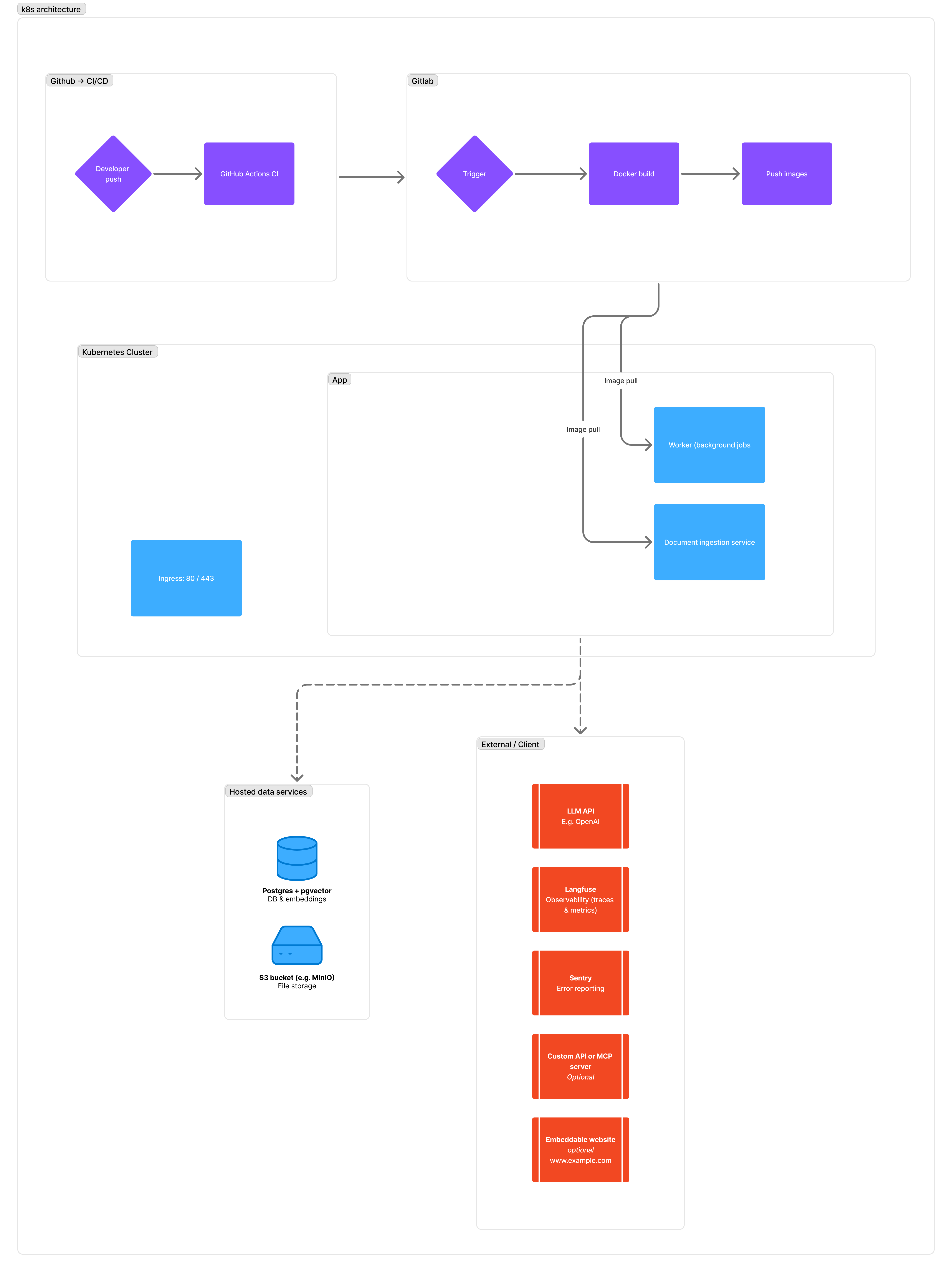
Key Components:
- Rails Application: Main backend API and admin dashboard
- PostgreSQL Database: Primary data storage
- Storage: File storage system
- Worker: Background job processing
- LLM Providers: OpenAI, Google Gemini, or Anthropic Claude
- Monitoring: Sentry (errors), Langfuse (LLM metrics)
Resource Configuration
Kubernetes pod resource allocation (requests are minimum guaranteed, limits are maximum allowed):
| Pod | Requests CPU | Requests RAM | Limits CPU | Limits RAM |
|---|---|---|---|---|
| web | 0.3 vCPU | 600 Mi | 1 vCPU | 1.5 Gi |
| worker | 0.3 vCPU | 600 Mi | 1 vCPU | 1.5 Gi |
| doc-ingest | 0.5 vCPU | 4 Gi | 2 vCPU | 8 Gi |
| Total | 1.1 vCPU | 5.2 Gi | 4.0 vCPU | 11.0 Gi |
Use kubectl top pods -n <namespace> to monitor actual usage against these limits.
Quick Reference
Critical Endpoints
- Health Check:
GET /up- Application health status - Admin Dashboard:
/admin/dashboards- System metrics overview - Job Monitoring:
/jobs- Background job status (requires super_admin role)
Access Requirements
- Admin Panel: Requires
adminorsuper_adminrole - Job Monitoring: Requires
super_adminrole only - Authentication: Email/password or OpenID Connect (if enabled)
Maintenance Schedule
Weekly Maintenance
Critical system checks that should be performed weekly. See Weekly Checks Guide for details.
Key Tasks:
- Monitor Sentry for errors
- Check system resources (disk, RAM, CPU)
- Review document health metrics
- Monitor LLM provider dashboards
- Verify background job status
- Test health endpoint
Monthly Maintenance
Comprehensive reviews performed monthly. See Monthly Checks Guide for details.
Key Tasks:
- Review LLM model deprecations
- Check API credit balances
- Audit user access and roles
- Verify backup restoration
- Analyze long-term trends
Detailed Guides
- Weekly Checks - Weekly maintenance checklist with specific instructions
- Monthly Checks - Monthly review procedures
- Backup Procedures - Database and file backup configuration
Support Resources
Application Logs
Check Kubernetes pod logs via kubectl logs -n <namespace> <pod-name>
Logs are sent to STDOUT/STDERR and managed by Kubernetes automatically.
Rails Commands (run from web pod)
- Console:
bin/rails console- Interactive Rails console - Runner:
bin/rails runner "code"- Execute Ruby code
Getting Help
Documentation
- Rails Guides: https://guides.rubyonrails.org/
- Kubernetes: https://kubernetes.io/docs/