Atlassian
How to configure the Atlassian Rovo MCP connector
The Atlassian Rovo MCP Server provides a cloud-based bridge to your Atlassian Cloud products — Jira, Confluence, and Compass. Users can search, create, and modify issues, pages, and components through natural language. Data access respects existing Jira, Confluence, and Compass user permissions.
Connector Settings
| Field | Value |
|---|---|
| Integration Type | MCP |
| URL | https://mcp.atlassian.com/v1/mcp |
| Transport Type | Streamable HTTP |
| Authentication Type | OAuth 2.1 |
This MCP server supports Dynamic Client Registration (RFC 7591) — OAuth Client ID and Client Secret are not required.
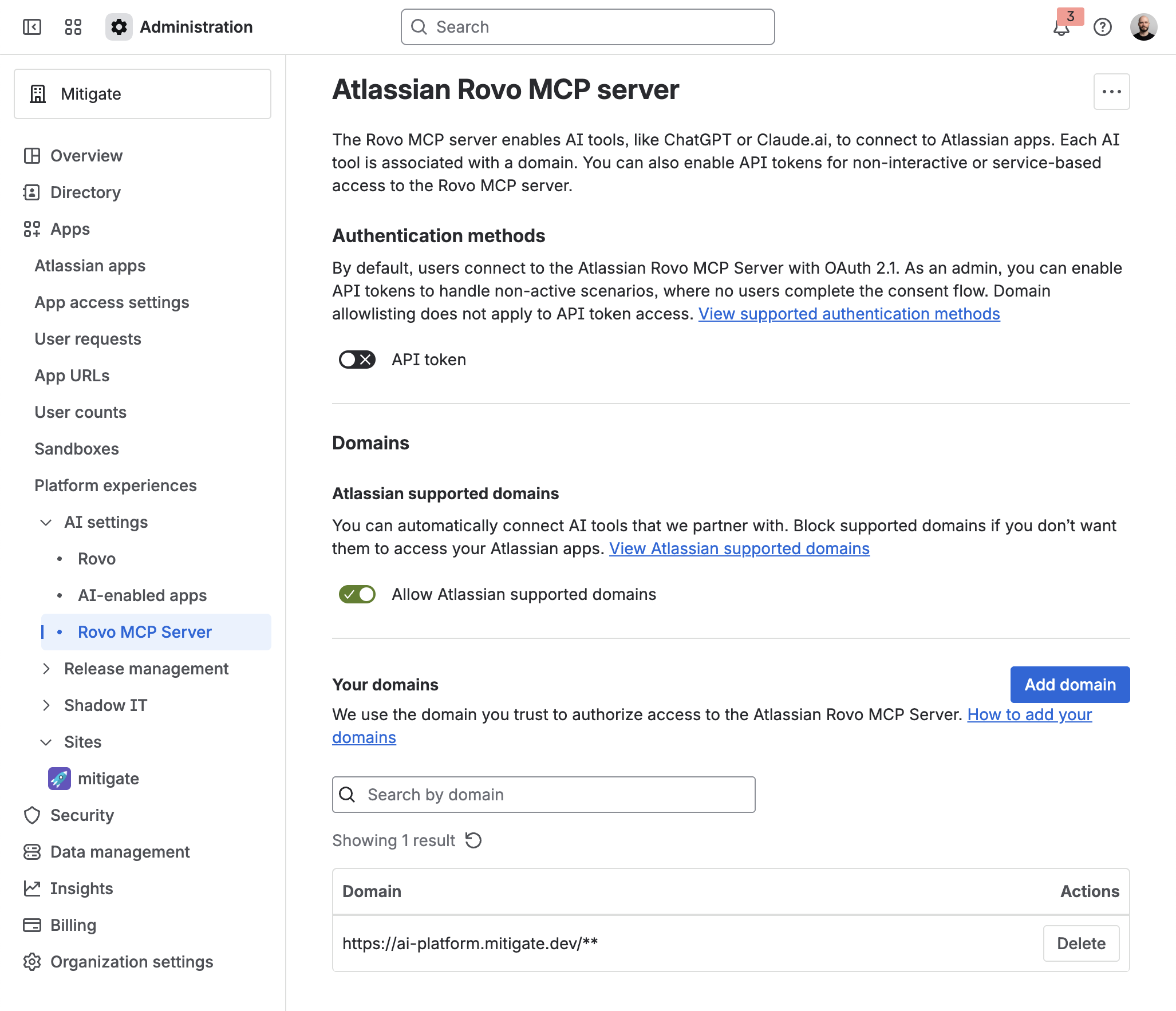
The domain ai-platform.mitigate.dev must be approved by your Atlassian organization admin before users can connect.
When connecting, users will see the message: "Your organization admin must authorize access from a domain to this site."
How to Fix (For Admins)
- Navigate to Administration: Go to admin.atlassian.com.
- Access AI Settings: Navigate to Apps → AI settings → Rovo MCP server.
- Add Domain: Select "Add domain" and enter
https://ai-platform.mitigate.dev/**.
Usage Examples
Once connected, users can interact with Jira and Confluence through natural language:
- "Show me all open bugs assigned to me in the PROJ project"
- "Create a new task in Jira for updating the API documentation"
- "Find the Confluence page about our deployment process"
Tools
Rovo Search Jira and Confluence
search
Searches across Jira and Confluence using Rovo Search. Use this tool to find issues, pages, and other content unless specifically searching with CQL or JQL.
Parameters:
- query - The search query to use for Rovo Search
Get Issue
getJiraIssue
Retrieves details of a specific Jira issue by its key or ID.
Parameters:
- issueIdOrKey - Issue ID or key (e.g.,
PROJ-123or10000) - cloudId - Cloud ID (UUID or site URL)
- responseContentFormat - Content format:
adf(Atlassian Document Format) ormarkdown. Defaults to ADF
Create Issue
createJiraIssue
Creates a new Jira issue in a specified project.
Parameters:
- summary - Issue summary
- projectKey - Project key
- issueTypeName - Issue type (
Task,Bug,Story) - cloudId - Cloud ID (UUID or site URL)
- description - Issue description
- contentFormat - Content format:
adformarkdown. Defaults to ADF - parent - Parent issue key for subtasks
- assignee_account_id - Assignee account ID
- additional_fields - Additional fields to set on the issue
Update Issue
editJiraIssue
Updates fields on an existing Jira issue.
Parameters:
- issueIdOrKey - Issue ID or key (e.g.,
PROJ-123or10000) - fields - Fields to update
- cloudId - Cloud ID (UUID or site URL)
- contentFormat - Content format:
adformarkdown. Defaults to ADF
Search With JQL
searchJiraIssuesUsingJql
Searches for Jira issues using JQL (Jira Query Language).
Parameters:
- jql - JQL query string
- cloudId - Cloud ID (UUID or site URL)
- maxResults - Maximum number of results (50–100)
- nextPageToken - Pagination token from a previous response
- responseContentFormat - Content format:
adformarkdown. Defaults to ADF
Add Comment
addCommentToJiraIssue
Adds a comment to a Jira issue.
Parameters:
- issueIdOrKey - Issue ID or key (e.g.,
PROJ-123or10000) - commentBody - Comment body
- cloudId - Cloud ID (UUID or site URL)
- contentFormat - Content format:
adformarkdown. Defaults to ADF
Transition Issue
transitionJiraIssue
Transitions a Jira issue to a new status. Use getTransitionsForJiraIssue to list available transitions first.
Parameters:
- issueIdOrKey - Issue ID or key (e.g.,
PROJ-123or10000) - transition - Transition to apply
- cloudId - Cloud ID (UUID or site URL)
- fields - Fields to set during the transition
- update - Update operations to apply
Get Transitions
getTransitionsForJiraIssue
Retrieves available status transitions for a Jira issue.
Parameters:
- issueIdOrKey - Issue ID or key (e.g.,
PROJ-123or10000) - cloudId - Cloud ID (UUID or site URL)
Get Projects
getVisibleJiraProjects
Lists Jira projects visible to the authenticated user.
Parameters:
- cloudId - Cloud ID (UUID or site URL)
- searchString - Filter projects by name
Get Issue Types
getJiraProjectIssueTypesMetadata
Lists available issue types for a Jira project.
Parameters:
- projectIdOrKey - Project ID or key
- cloudId - Cloud ID (UUID or site URL)
Get Field Metadata
getJiraIssueTypeMetaWithFields
Retrieves field metadata for a specific issue type in a project.
Parameters:
- projectIdOrKey - Project ID or key
- issueTypeId - Issue type ID
- cloudId - Cloud ID (UUID or site URL)
Get Issue Link Types
getIssueLinkTypes
Lists available Jira issue link types (e.g., Duplicate, Blocks, Clones, Relates).
Parameters:
- cloudId - Cloud ID (UUID or site URL)
Create Issue Link
createIssueLink
Creates a link between two Jira issues. Use getIssueLinkTypes to list available link types first.
Parameters:
- type - Link type name (e.g.,
Duplicate,Blocks,Clones,Relates) - inwardIssue - Inward issue key (e.g.,
HSP-1) - outwardIssue - Outward issue key (e.g.,
MKY-1) - cloudId - Cloud ID (UUID or site URL)
- comment - Optional comment on the outward issue
- contentFormat - Content format:
adformarkdown. Defaults to ADF
Get Remote Links
getJiraIssueRemoteIssueLinks
Retrieves remote issue links for a Jira issue.
Parameters:
- issueIdOrKey - Issue ID or key (e.g.,
PROJ-123or10000) - cloudId - Cloud ID (UUID or site URL)
Lookup Users
lookupJiraAccountId
Looks up Jira user account IDs by search string.
Parameters:
- searchString - Name or email to search for
- cloudId - Cloud ID (UUID or site URL)
Add Or Update Worklog
addWorklogToJiraIssue
Adds a new worklog entry or updates an existing one on a Jira issue.
Parameters:
- issueIdOrKey - Issue ID or key (e.g.,
PROJ-123or10000) - timeSpent - Time spent (e.g.,
2h,30m,4d). Required for new worklogs - cloudId - Cloud ID (UUID or site URL)
- started - When the work was started (ISO 8601, e.g.,
2026-03-09T09:00:00.000+0000). Defaults to current time - worklogId - ID of an existing worklog to update. Omit to create a new one
- commentBody - Comment body
- contentFormat - Content format:
adformarkdown. Defaults to ADF
Retrieve Confluence Page
getConfluencePage
Retrieves a Confluence page by its ID, including body content.
Parameters:
- pageId - Confluence page ID from the page URL (e.g.,
123456789) - cloudId - Cloud ID (UUID or site URL)
- contentFormat - Content format:
adformarkdown. Defaults to ADF
Create Confluence Page
createConfluencePage
Creates a new Confluence page in a specified space.
Parameters:
- title - Page title
- body - Page content
- spaceId - Space ID
- cloudId - Cloud ID (UUID or site URL)
- parentId - Parent page ID
- contentFormat - Content format:
adformarkdown. Defaults to ADF - isPrivate - Make the page private
Update Confluence Page
updateConfluencePage
Updates an existing Confluence page.
Parameters:
- pageId - Page ID to update
- cloudId - Cloud ID (UUID or site URL)
- title - New title
- body - Page content
- status - Page status
- spaceId - Space ID
- parentId - Parent page ID
- contentFormat - Content format:
adformarkdown. Defaults to ADF - versionMessage - Version message
Search Confluence With CQL
searchConfluenceUsingCql
Searches Confluence content using CQL (Confluence Query Language).
Parameters:
- cql - CQL query string (e.g.,
title ~ "meeting" AND type = page) - cloudId - Cloud ID (UUID or site URL)
- limit - Maximum results (default: 25, max: 250)
- cursor - Pagination cursor
Get Spaces
getConfluenceSpaces
Lists Confluence spaces accessible to the authenticated user.
Parameters:
- cloudId - Cloud ID (UUID or site URL)
- keys - Filter by space keys
- type - Space type
- limit - Maximum results (default: 25, max: 250)
- status - Space status
- labels - Filter by space labels
Get Pages In Space
getPagesInConfluenceSpace
Lists pages in a Confluence space.
Parameters:
- spaceId - Space ID
- cloudId - Cloud ID (UUID or site URL)
- title - Filter by title
- sort - Sort order
- limit - Maximum results (default: 25, max: 250)
- cursor - Pagination cursor
- status - Page status
- contentFormat - Content format:
adformarkdown. Defaults to ADF
List Page Descendants
getConfluencePageDescendants
Retrieves child pages of a specified Confluence page.
Parameters:
- pageId - Page ID
- cloudId - Cloud ID (UUID or site URL)
- depth - Maximum depth
- limit - Maximum number of descendants
- cursor - Pagination cursor
Get Page Comments
getConfluencePageFooterComments
Retrieves footer comments on a Confluence page.
Parameters:
- pageId - Page ID
- cloudId - Cloud ID (UUID or site URL)
- sort - Sort order
- limit - Maximum number of comments
- cursor - Pagination cursor
- status - Comment status
- contentFormat - Content format:
adformarkdown. Defaults to ADF
List Page Inline Comments
getConfluencePageInlineComments
Retrieves inline comments on a Confluence page.
Parameters:
- pageId - Page ID
- cloudId - Cloud ID (UUID or site URL)
- sort - Sort order
- limit - Maximum number of comments
- cursor - Pagination cursor
- status - Comment status
- contentFormat - Content format:
adformarkdown. Defaults to ADF - resolutionStatus - Filter by resolution status
Get Comment Replies
getConfluenceCommentChildren
Retrieves reply comments for a specific comment.
Parameters:
- commentId - Parent comment ID
- cloudId - Cloud ID (UUID or site URL)
- commentType - Comment type
- sort - Sort order
- limit - Maximum number of replies
- cursor - Pagination cursor
- contentFormat - Content format:
adformarkdown. Defaults to ADF
Create Confluence Footer Comment
createConfluenceFooterComment
Creates a footer comment on a Confluence page.
Parameters:
- pageId - Page ID to comment on
- body - Comment content
- cloudId - Cloud ID (UUID or site URL)
- contentFormat - Content format:
adformarkdown. Defaults to ADF - parentCommentId - Parent comment ID for replies
Create Confluence Inline Comment
createConfluenceInlineComment
Creates an inline comment on specific text within a Confluence page.
Parameters:
- pageId - Page ID to comment on
- body - Comment content
- cloudId - Cloud ID (UUID or site URL)
- contentFormat - Content format:
adformarkdown. Defaults to ADF - parentCommentId - Parent comment ID for replies
- inlineCommentProperties - Text selection properties for highlighting
Fetch Content With ARI
fetch
Retrieves details of a Jira issue or Confluence page by ARI (Atlassian Resource Identifier).
Parameters:
- id - Atlassian Resource Identifier (e.g.,
ari:cloud:jira:cloudId:issue/10107orari:cloud:confluence:cloudId:page/123456789)
List Accessible Resources
getAccessibleAtlassianResources
Lists Atlassian Cloud sites and products accessible to the authenticated user. Use this to retrieve cloudId values needed by other tools.
Get Current User Info
atlassianUserInfo
Retrieves information about the currently authenticated Atlassian user.